| IAP Software ™ |  |
| IAP Software ™ | |
Operational Periods
An operational period is a set time frame, established by command, in which measurable strategic objectives are to be achieved. The two primary functions in this section are to allow users to create new operational periods and to select and maintain existing ones.
Contents
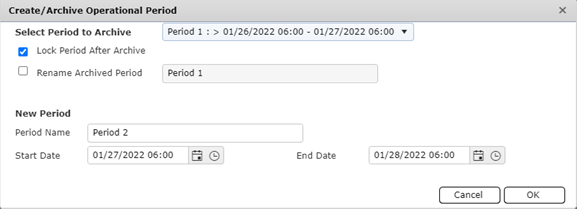
If an incident continues past the first operational period, you will need to save/archive the information and create a new period.
A window will appear with the information to choose a new period.
Select Period to copy from and archive in the drop down.
Choose “Create Empty (Do not copy)”  if you do not want to copy the period.
Select Lock Period After Archive  to make the information only viewable, not editable.
Select the Rename Archived Period  and enter appropriate text to rename the existing period about to be archived.
Name the new Period and enter the Start Date/Time and End Date/Time.
Click OK.
NOTE: The new period will default to the Operational Period established when the incident was created.
© 2024, TRG The Response Group LLC., All rights are reserved.
No part of this web site, and the information which it contains, may be reproduced, stored in a retrieval system or transmitted in any form or by any means, electronic, mechanical, photocopying, recording or otherwise, without prior written permission of TRG.

 .
.