| IAP Software ™ |  |
| IAP Software ™ | |
Safety Status
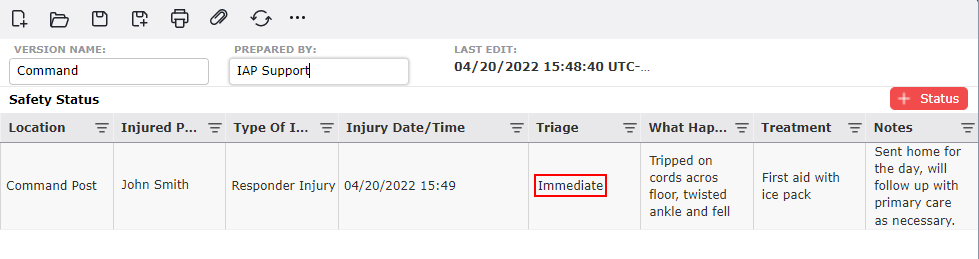
The Safety Status report is used to report injuries that occur for both incident responders and for the general public. For help using general form functions (e.g. Create/Open Version, Save, etc.) and accessing preloaded versions, see the General Form Functions page.
Contents
To add a safety incident, click on the Add button  .
.
In the Location column, select from the drop down the Area of Operation in which the incident occurred.
Free type to enter the name of the person who was injured under Injured Person Name.
For the Type of Injury, free type or select the type of injury from the drop-down list.
Click on the Calendar Control button  in Injury Date/Time field to enter the date and time of the injury, in 24-hour format. Calendar Control allow the user to easily pick a date and time. For more information, see the Calendar Control page.
Select the priority for the person with the populated dropdown choices in the Triage column.
Free type the cause of injury in the What Happened field.
Free type to enter the method of treatment for the individual under the Treatment column and Notes.
© 2024, TRG The Response Group LLC., All rights are reserved.
No part of this web site, and the information which it contains, may be reproduced, stored in a retrieval system or transmitted in any form or by any means, electronic, mechanical, photocopying, recording or otherwise, without prior written permission of TRG.