| IAP Software ™ |  |
| IAP Software ™ | |
Check-In Survey Report
A set of screening questions can be included as part of the daily check-in process. These questions must be answered before personnel are permitted to enter the worksite. The Check-In Survey Report provides a central location to view responses to the established survey. To learn how to establish a check-in survey, see the Survey Setup page. For more information on general form functions, please see the General Form Functions page.
Contents
View a Detailed Individual Report
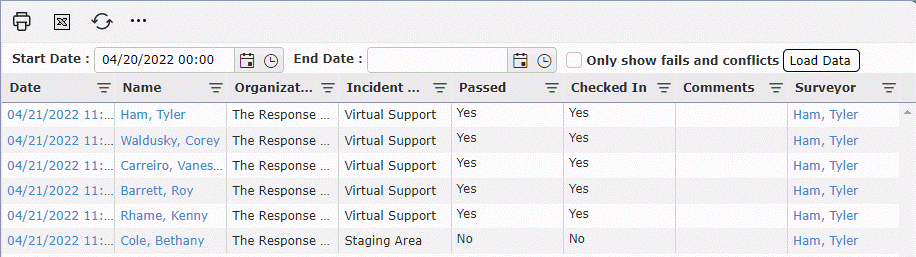
As personnel check-in and answers are provided to the survey questions, results of the survey are stored within the system and can be viewed later. The Survey Report, by default, will display surveys from the current day that have fails or conflicts.
The start date will automatically default to yesterday’s date and can be adjusted as needed.
Use the Calendar Control buttons  or free type to change the Start Date, End Date and time.
Use the checkbox  to choose to show either all results or only show fails and conflicts.
Click the Load Data button  to apply the parameters and view the results.
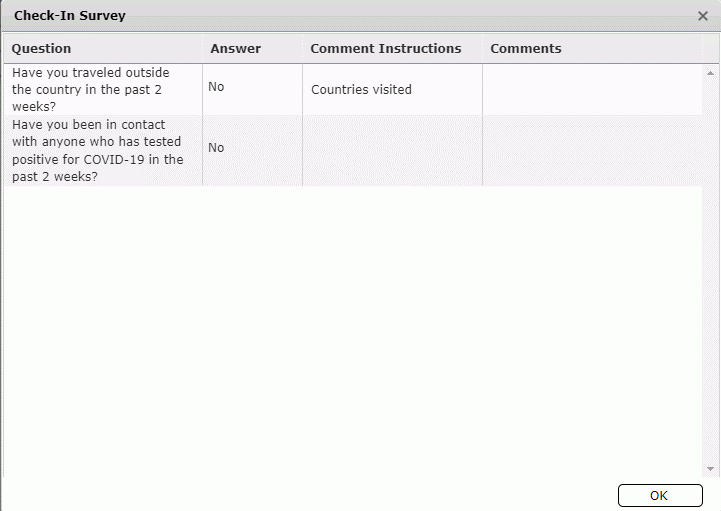
Individual survey responses can be viewed along with any Comments recorded. Click on the Name of the person for whom the survey will be viewed. The recorded survey information will be displayed for viewing in the Check-In Survey pop-up.
Users can Export a summary of the check-in surveys conducted. The Excel file provided can then be saved by the user.
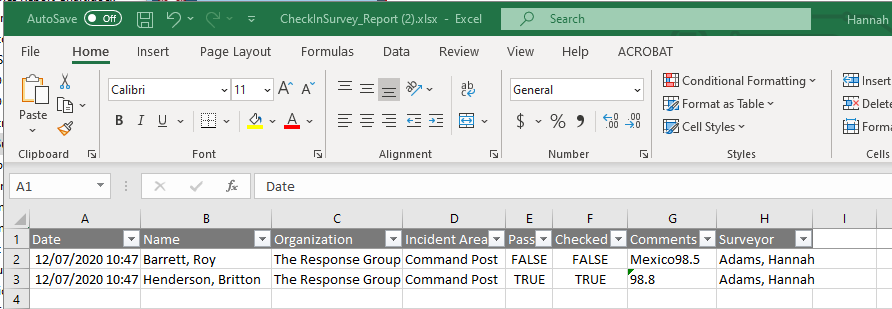
NOTE: The export will use the same filter parameters applied on screen (i.e. date range or show fails/conflicts).
© 2024, TRG The Response Group LLC., All rights are reserved.
No part of this web site, and the information which it contains, may be reproduced, stored in a retrieval system or transmitted in any form or by any means, electronic, mechanical, photocopying, recording or otherwise, without prior written permission of TRG.