| IAP Software ™ |  |
| IAP Software ™ | |
Get Rich Text Preloads
Rich text information can be preloaded and used within several forms in the IAP Software.
NOTE: Before rich text can be pulled into a form, an Administrator must create Rich Text Preloads. For more information, see the Default Text - Form Fields page.
Contents

Click the Get Preloads button  to open the Rich Text Preloads window.
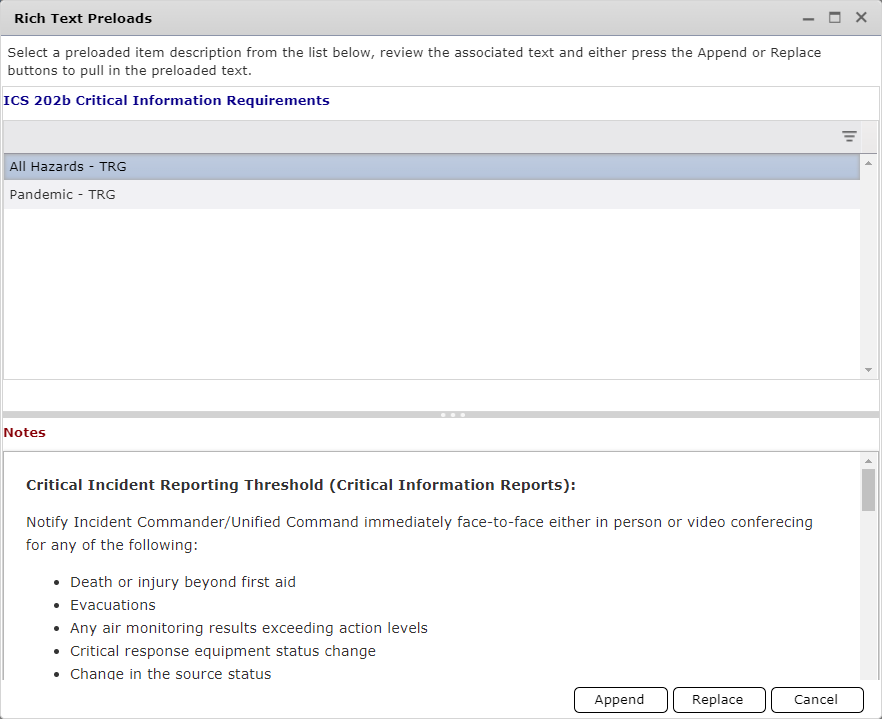
Highlight the Preload that is needed and click to populate the field.
Click the Append Button  to add the preloaded information to the form and keep any current information there.
Click the Replace Button  to completely replace existing information in the form.
© 2024, TRG The Response Group LLC., All rights are reserved.
No part of this web site, and the information which it contains, may be reproduced, stored in a retrieval system or transmitted in any form or by any means, electronic, mechanical, photocopying, recording or otherwise, without prior written permission of TRG.