| IAP Software ™ |  |
| IAP Software ™ | |
Default Text – Form Fields
The Default Text – Form Fields allows users to preload and edit rich text statements and lists that can be added to several forms (e.g. ICS 202a – Command Direction, ICS 206 - Medical Plan, ICS 209 – Incident Status Summary). It consists of three sections: Preload Type to define the form and field that will be preloaded, Name of the preload for the Preload Type, and a Snippet of information.
Contents
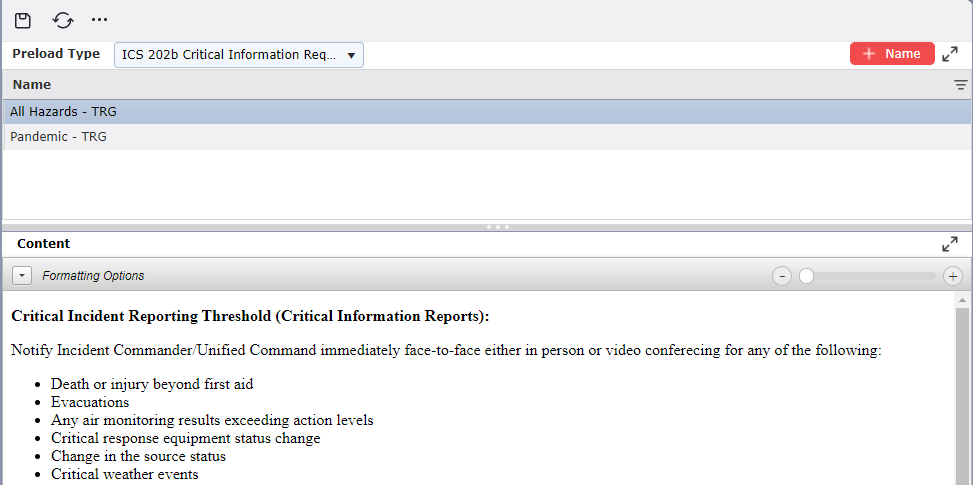
Rich text preloads can be added, saved, and made available to load into several forms.
Choose the Preload Type to create from the drop-down menu.

Click the Add Name button  . This will create a blank line in the name section where users can name the preload.
In the snippet field, enter the text to be available as preloaded information.
NOTE: There are many formatting features available for use when populating text for the preload. Click the arrow next to Formatting Options  to make these features available. For more information on using these features see the General Form Functions page.
Click the Save button  to save changes.
NOTE: The snippet contains information that a user can load within several forms when clicking  from within a form.
Rich text preloads can be edited as well.
Choose the Preload Type to edit from the drop-down menu.

Click to select the name of the preload to be edited. The corresponding snippet field content will appear.
Edit the snippet field content, as necessary.
Click the Save button  to save changes.
Rich text preloads that are no longer needed can be removed from the database.
Choose the Preload Type to delete from the drop-down menu.

Hover over the item you wish to remove and click the Delete button  . Next, confirm the option to delete by clicking OK.

© 2024, TRG The Response Group LLC., All rights are reserved.
No part of this web site, and the information which it contains, may be reproduced, stored in a retrieval system or transmitted in any form or by any means, electronic, mechanical, photocopying, recording or otherwise, without prior written permission of TRG.