| IAP Software ™ |  |
| IAP Software ™ | |
Waste Management
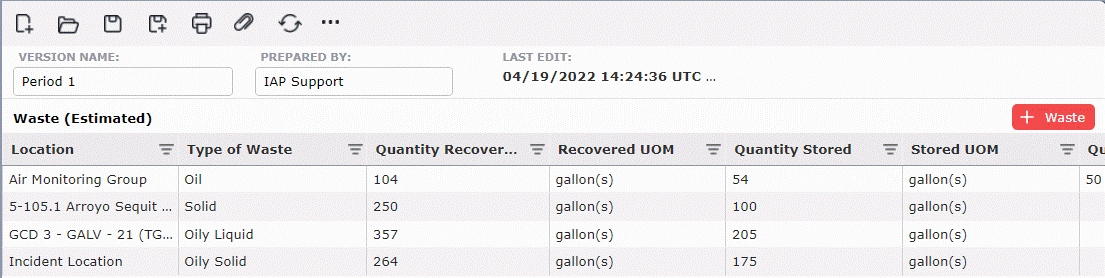
The Waste Management form allows users to track the quantity of waste recovered, stored, disposed of, and disposal location. For help using general form functions (e.g. Create/Open Version, Save, etc.), see the General Form Functions page.
Contents
Click the Add button  to create a new line item.
Free type or select from the drop-down choices the Location of the waste.
Free type or select the Type of Waste from the drop-down choices.
Enter the numeric value in the Quantity Recovered, Stored and Disposed and select the unit of measurement associated with each.
The final location of the waste falls under the Disposal Location column.
The user can select the desired Disposal Plan for the selected type of waste using the dropdown list under the Applicable Disposal Plan column.
Additional notes can be added in the Notes column.
NOTE: Clicking on any header will filter from A-Z by that column. Clicking again will filter from Z-A. Each field can also be filtered by clicking on the Filter button  to allow advanced filtering options.
© 2024, TRG The Response Group LLC., All rights are reserved.
No part of this web site, and the information which it contains, may be reproduced, stored in a retrieval system or transmitted in any form or by any means, electronic, mechanical, photocopying, recording or otherwise, without prior written permission of TRG.