| IAP Software ™ |  |
| IAP Software ™ | |
ICS 203 Organization Assignment List
The Organization Assignment List documents the personnel that are currently activated and the section/position those individuals hold for the incident. This list is organized by Section and can be used in conjunction with the ICS 207 Organization Chart. For help using general form functions (e.g. Create/Open Version, Save, etc.) and accessing preloaded versions, see the General Form Functions page.
Contents
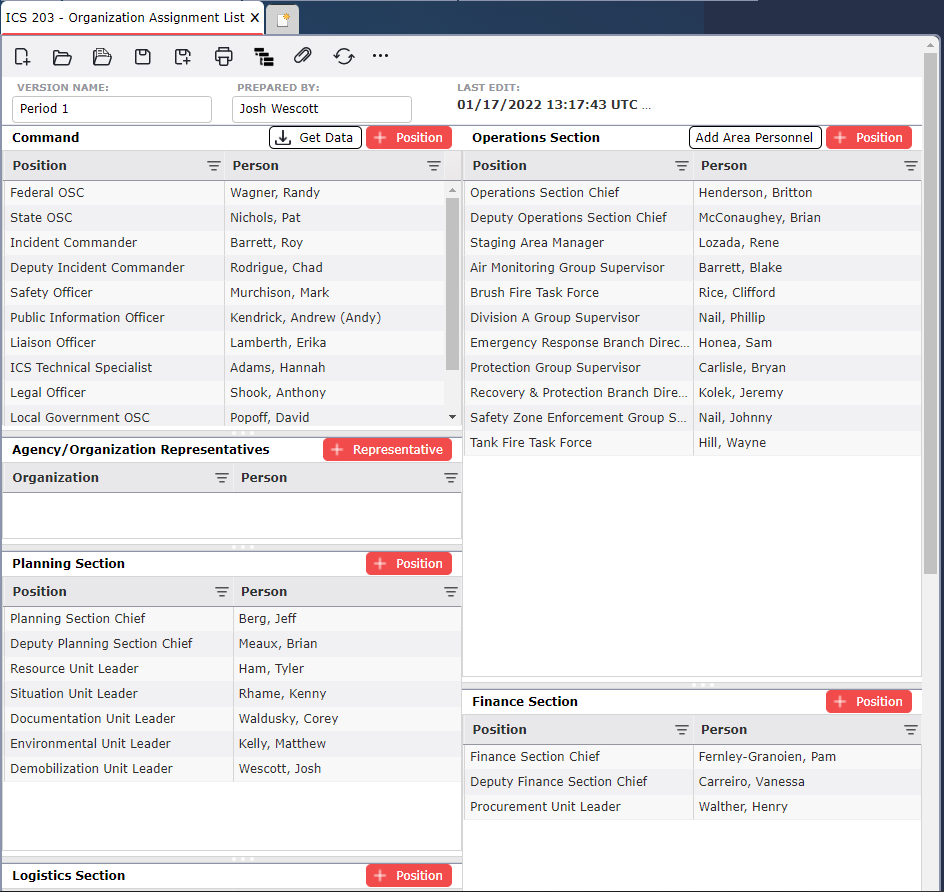
User can manually add a position and name under a section/agency/organization.
NOTE: For reference purposes, to assist with building the Operations Section organization, users can access a list of currently activated Areas of Operations by clicking on the View Areas button  on the Button Toolbar at the top of the form.
Click the Add button  to add a position and individual name.
Manually enter the name and position title or select a name from the drop-down list if available. If names are in the personnel list and preloaded contact information exists, the available fields will populate.
Click on the Get Data button  to pull in names from other forms (i.e. ICS 201-3, ICS 211, ICS 205a).
There is also an option in the name drop-down field to Create New  personnel. To learn more, see the Create New Personnel Drop Down page.
For the Operations Section, click the Add Area Personnel button  to select personnel from positions designated on other forms.
To remove an item, hover over the desired item for a moment and the delete button will appear, then click on the Delete button  to remove the item. If you remain hovering over the item without clicking the delete button, the delete button will disappear after a couple of seconds.
NOTE: Select a person and drag-and-drop to reorder the Position within each section. The position titles from the source must match in the working version for the Get Personnel Data to pull the correct name.
© 2024, TRG The Response Group LLC., All rights are reserved.
No part of this web site, and the information which it contains, may be reproduced, stored in a retrieval system or transmitted in any form or by any means, electronic, mechanical, photocopying, recording or otherwise, without prior written permission of TRG.